
Tailscale vs. WireGuard on pfSense: Which Should You Run?
Short answer: run WireGuard on pfSense if you can open a UDP port, and add Tailscale if you’re behind CGNAT or need to hand access to people who won’t edit a config file. The encryption is identical — Tailscale is WireGuard with a control plane on top. The deciding factor on pfSense is that FreeBSD can’t run Tailscale’s kernel mode, so subnet routing and exit nodes go through a userspace stack, which changes how packets are forwarded and makes exit node duty noticeably slow.
That last part is what most Tailscale vs. WireGuard comparisons miss. They frame the choice as convenience versus control, which is true everywhere and useful nowhere in particular. On a pfSense box the choice has a concrete architectural consequence you can measure.
This post covers the decision table, why the platform constraint exists, how a tailnet behaves on a dual-stack network, what the free plan actually includes as of 2026, and a verification procedure for your own firewall. Everything here was checked against pfSense-pkg-Tailscale 0.1.9_2 running tailscale 1.94.1.
Tailscale vs. WireGuard on pfSense: quick comparison
| Factor | WireGuard (pfSense package) | Tailscale (pfSense package) |
|---|---|---|
| Data plane | Kernel if_wg module | wireguard-go in userspace |
| Packet forwarding | Kernel, Layer 3 | gVisor netstack, Layer 4 |
| Inbound port required | Yes, one UDP port | No |
| Works behind CGNAT | No, not without a relay you build | Yes |
| Key management | You generate and distribute | Automatic, rotated |
| Peer discovery | Static endpoints or DDNS | Coordination server |
| ICMP other than ping | Yes | No |
| Protocols other than TCP/UDP | Yes | No |
| Access control | pf rules | pf rules plus tailnet ACLs |
| IPv6 addressing | Your real GUA prefixes | Tailnet ULA, plus routed subnets |
| Viable as a full-tunnel exit | Yes | Poor — see the exit node section |
| Third-party dependency | None | Control plane, unless self-hosted |
| Recovers itself after an IP change | No | Yes |
| Cost at homelab scale | Free | Free, with limits worth reading |
Choose WireGuard when you control both ends, the peer list is small and stable, and you want full-tunnel performance or Layer 3 transparency. Choose Tailscale when you can’t get an inbound port, when devices roam constantly, or when the people using it will never touch a config file.
How Tailscale and WireGuard differ architecturally
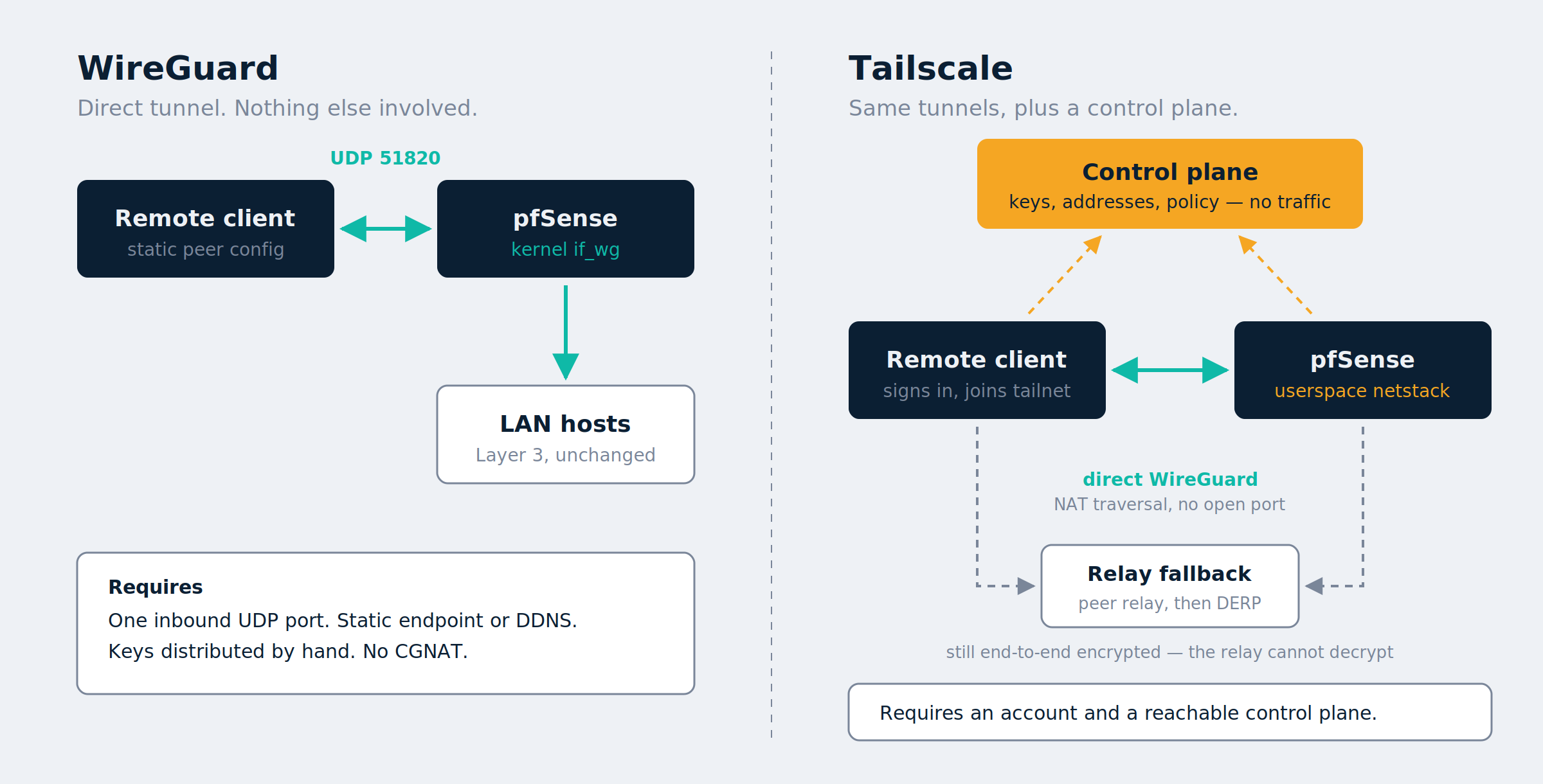
WireGuard on pfSense is a kernel tunnel. The package installs wireguard-kmod, which provides the if_wg kernel driver — the in-kernel implementation tracking upstream, not a Go reimplementation. You define peers by public key, allowed IPs, and endpoint. You open a UDP port. Nothing external is involved: if both ends can reach each other the tunnel works, and it keeps working regardless of what any vendor’s infrastructure is doing.
Tailscale splits control from data. A coordination server distributes public keys, addresses, and policy; the packets themselves ride WireGuard tunnels directly between peers. When a direct connection can’t be established, traffic falls back to a relay — and that relay can’t read anything, because private keys never leave the device that generated them, so a DERP server blindly forwards already-encrypted traffic.
That relay path is no longer only Tailscale’s, either. Peer relays let you designate one of your own nodes as a relay by assigning it a UDP port, and devices try any available peer relay before falling back to DERP. A VPS is a reasonable candidate. It requires Tailscale 1.86 or later on both the relay and the devices using it, and the relay can run any supported OS except iOS, Apple TV, or Android.
Why pfSense can’t run Tailscale in kernel mode
This is the constraint that should drive your decision, and it’s not a throughput footnote.
Tailscale’s documentation on kernel vs. netstack routing states that userspace mode applies when Tailscale runs on an operating system other than Linux — such as FreeBSD, macOS, or Windows — and that this is the only way to run subnet routers and exit nodes on those systems. pfSense is FreeBSD. There is no kernel mode to switch to.
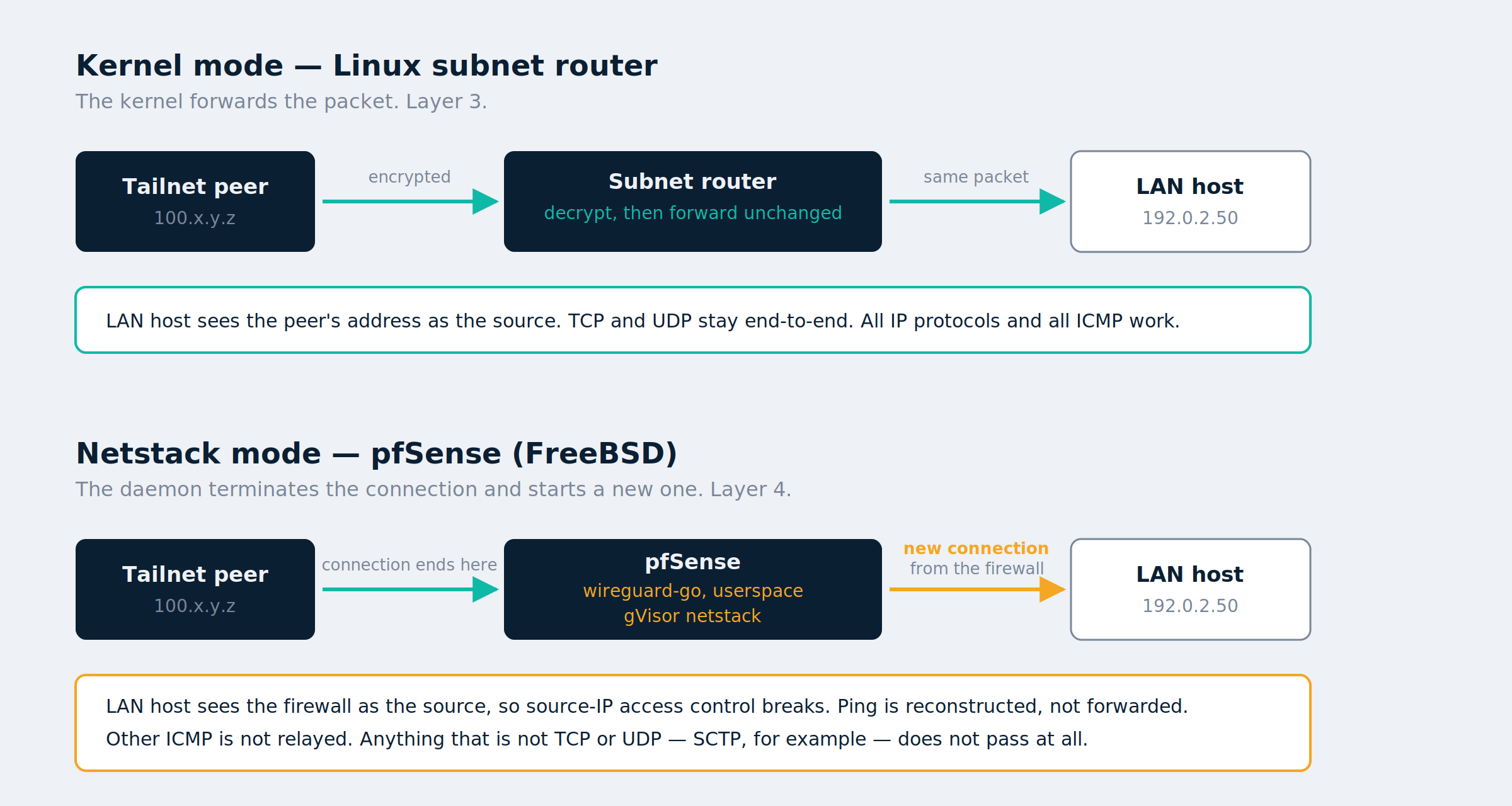
What changes is the forwarding model itself. In userspace mode Tailscale uses the gVisor netstack library, terminating TCP and UDP connections from the origin peer and making new outbound connections to the target, stitching the two together. In kernel mode the OS forwards packets, Tailscale doesn’t rewrite them, TCP streams stay end-to-end, and all IP protocols are supported.
| Behavior | Kernel mode (Linux) | Netstack mode (pfSense) |
|---|---|---|
| Routing layer | Layer 3, IP | Layer 4, TCP and UDP |
| TCP end-to-end | Yes | No, reconstructed |
| UDP end-to-end | Yes | No, reconstructed |
| ICMP | All | Ping only, reconstructed |
| SCTP and other IP protocols | Yes | Not supported |
What netstack mode breaks on a pfSense subnet router
- Traffic reaching a LAN host over the tailnet is a new connection originated by the firewall, not the original peer’s packet. Anything downstream doing source-IP-based access control sees the wrong address.
- Ping works because the daemon issues its own ping to the target and answers the original request if that succeeds. It’s a reconstruction, and it adds a little apparent latency.
- Other ICMP isn’t relayed at all, and protocols outside TCP and UDP — SCTP, for example — don’t work. Path MTU discovery and anything depending on ICMP error messages is worth testing rather than assuming.
- Pointing the pfSense box itself at someone else’s exit node doesn’t behave as expected. There’s an open upstream issue where a pfSense firewall configured with
--exit-nodestill reports its ISP address fromcurl ifconfig.meon the firewall itself, while phones and desktops on the same tailnet exit correctly. That’s consistent with netstack mode: there’s no tunnel interface for the host’s own traffic to use.
Tailscale exit node performance on pfSense is the weak spot
Subnet routing in netstack mode is tolerable. Using pfSense as a Tailscale exit node is where it falls down, and this is first-hand rather than extrapolated from documentation: throughput through a pfSense exit node is slow enough to notice immediately, well before the WAN becomes the limiting factor.
The architecture explains it. An exit node does the most per-packet work of any role — decrypt inbound tailnet traffic in userspace, terminate and re-originate every flow through netstack, then encrypt the return path — all in a userspace Go implementation, on a CPU specified for pf and NAT rather than bulk symmetric crypto. Reaching a few internal services rarely pushes that hard. Full-tunneling a phone’s entire internet connection through it does, continuously.
If full-tunnel VPN back through your house is the goal, use the kernel WireGuard package; that build is covered in the WireGuard remote access guide. Treat Tailscale on pfSense as a way to reach internal resources, not as a full-tunnel gateway.
None of this makes Tailscale a bad choice here. Tailscale’s own position is that userspace mode is more than sufficient for smaller numbers of users or low bandwidth, and that kernel mode is for heavily used subnet routers. Reaching internal services is squarely inside “sufficient.” Just don’t expect Layer 3 transparency, and don’t benchmark it against the kernel WireGuard tunnel and conclude something is broken.
How Tailscale handles IPv6 on a dual-stack network
If you run native IPv6, be clear about what joining a tailnet adds and what it doesn’t.
Every device gets a private IPv6 address from the fd7a:115c:a1e0::/48 unique local prefix, which means IPv6 works inside the tailnet even if your ISP offers no IPv6 at all. That’s ULA space, not your delegated prefix, and MagicDNS names resolve into that reserved range. If the distinction between ULA and GUA is fuzzy, the IPv6 subnetting reference covers it.
Public IPv6 plays a different role. Tailscale can use ISP-assigned public IPv6 when negotiating connections between devices, but only when both ends have it. Your real v6 is a transport path, not the addressing you get inside the overlay.
Reaching actual dual-stack LAN hosts means advertising routes, and a single subnet router can advertise IPv6 prefixes alongside IPv4. There’s also 4via6, which solves the problem that makes hub-and-spoke WireGuard painful: it lets a tailnet device connect to distinct overlapping subnets that use the same IPv4 addresses, by mapping each site’s range into a synthetic IPv6 route with a site ID. If you’ve ever merged two sites that both used 192.168.1.0/24 — the scenario in the multi-site WireGuard guide — that’s the feature worth knowing about.
A plain WireGuard tunnel carries whatever you put in AllowedIPs, including your real GUA space, with no translation and no synthetic addressing.
Tailscale pricing, limits, and self-hosted alternatives
Tailscale’s plans changed in April 2026 and most comparison articles still quote the old ones. Current terms from Tailscale’s pricing page: Personal is free forever and includes unlimited user devices, up to 6 users, 3 ACL groups, 50 tagged resources to start, and 1,000 ephemeral resource minutes per month. Standard is $8 per user per month; Premium is $18.
The line homelabbers should read twice is the tagged-resource one. A user device is anything not tagged as a resource, and those are free and unlimited — but servers, subnet routers, app connectors, and other shared infrastructure should be tagged, and tagged resources beyond the 50 included cost $1 per month each. Your pfSense box acting as a subnet router or exit node belongs in that category. Fifty is plenty for a house; it’s not much for a lab that tags every VM. Tailscale also notes it isn’t currently enforcing hard limits on ACL groups, tagged resources, or ephemeral resources, with enforcement and notifications planned — so today’s bill isn’t necessarily next year’s.
One more term worth noticing: the Personal plan is only for non-commercial use, and tailnets created with a custom domain are treated as business use and enrolled in a trial. Signing up with your own domain puts you on a different track than signing up with a personal account.
Headscale and peer relays
If the dependency rather than the price is the objection, there are two real answers.
Headscale replaces the control plane with software you run. Current stable is 0.29.3, and the official feature list confirms MagicDNS, split DNS, Taildrop and Taildrive, tags, subnet routers, exit nodes, dual stack, ephemeral nodes, an embedded DERP server, peer relays, ACLs and grants, Tailscale SSH, and OIDC registration. What it doesn’t implement is Funnel, Serve, and network flow logs. Several currently ranking articles claim Headscale lacks MagicDNS and Taildrop; per the project’s own documentation, that’s wrong. The tradeoff is real but different — your control plane becomes your uptime problem, and the project deliberately scopes itself to a single tailnet for self-hosters and small organizations.
Peer relays address the relay path rather than the control plane, at much lower cost. Designating your own VPS keeps relayed traffic off Tailscale’s infrastructure without running a control server. A tailscale 1.94.1 install clears the version floor comfortably. The pfSense package GUI doesn’t expose the flag, so it goes in through Diagnostics > Command Prompt — verify it survives a package restart on your box before relying on it.
Plain WireGuard remains the option with no third party in it at all, which is the reason to keep one configured even after Tailscale is working.
Step 1 — Check the Tailscale and WireGuard packages on pfSense
From Diagnostics > Command Prompt or SSH:
pkg info | grep -i tailscale
tailscale version
kldstat | grep if_wg
The first two confirm package and daemon versions. The third shows whether the WireGuard kernel module is loaded, which is the quickest way to see the architectural split on one box: WireGuard is a kernel module, Tailscale is a userspace daemon.
Step 2 — Create a reusable Tailscale auth key
Don’t reuse a one-off key from the web login flow. For an unattended device, generate a reusable, non-ephemeral pre-authentication key in the admin console under Settings > Keys.
This matters more than it looks. Setting “Key Expiry: Disabled” on the device in the web UI applies to machines authenticated through web login; a firewall authenticated with the wrong key type drops off the tailnet when the key lifetime ends — usually while you’re away from home and depending on it. Tag the key at creation time if you plan to use ACLs. Tagged devices are owned by the tag rather than by your user identity, which is also what puts them in the tagged-resource bucket described above.
Step 3 — Install the Tailscale package on pfSense
Install from System > Package Manager > Available Packages, then open VPN > Tailscale. Paste the key under Authentication, save, then enable the daemon under Settings.
On newer pfSense releases, check which FreeBSD ABI the available Tailscale package targets before upgrading aggressively. Mismatches here are a recurring source of breakage on the Netgate forum, and the newest client version buys very little for this use case.
Step 4 — Advertise subnet routes and an exit node
Set advertised routes under VPN > Tailscale > Settings, or from the CLI:
tailscale up --advertise-routes=192.0.2.0/24,2001:db8:1:1::/64 --advertise-exit-node --accept-dns=false
Substitute your real LAN prefixes. --accept-dns=false is deliberate on a firewall: you almost certainly want pfSense’s own resolver deciding DNS rather than tailnet DNS settings being pushed onto the router. To let tailnet clients resolve internal names, point the tailnet’s nameserver at pfSense in the admin console under DNS > Nameservers with a restricted search domain, instead of overriding resolution on the firewall itself.
Routes and exit nodes then need approval in the admin console under Machines > Edit route settings. Nothing routes until you approve it there — the single most common “it doesn’t work” cause.
Step 5 — Write pfSense firewall rules for the Tailscale interface
The package creates a dedicated interface group for Tailscale traffic. Treat it like any other untrusted-by-default interface: default deny, then permit only what you intend.
Tailnet ACLs and pf rules are independent layers — a permissive ACL doesn’t open a pf rule, and vice versa. If you’ve already segmented Guest and IoT VLANs per the VLAN segmentation guide, decide explicitly whether tailnet traffic may cross into them. “It’s my VPN” is not a security posture.
Step 6 — Verify the Tailscale connection type: direct, relay, or peer-relay
Reachability alone tells you nothing about how traffic is getting there.
tailscale status
tailscale netcheck
tailscale ping <peer-hostname>
tailscale status reports each peer’s connection type. direct is the good outcome; relay means DERP is carrying it. netcheck shows whether UDP works, whether your IPv4 and IPv6 endpoints were discovered, and DERP latency per region — a nearest-DERP hundreds of milliseconds away explains a lot of slow tailnets.
With a peer relay configured, connections through it report as peer-relay:
tailscale status | grep peer-relay
Step 7 — Benchmark Tailscale vs. WireGuard throughput with iperf3
Run iperf3 -s on a LAN host, then test from the same remote client twice — once over the WireGuard tunnel, once over the tailnet.
iperf3 -c 192.0.2.50 -t 30
iperf3 -c 192.0.2.50 -t 30 -R
Test both directions. On a typical residential uplink the WAN is the bottleneck and the two look similar. On fast symmetric fiber, or with a relayed rather than direct tailnet connection, the gap becomes obvious — and now you know which number belongs to which architecture instead of guessing. Repeat the test with an exit node in play if you want to see the effect described earlier for yourself.
Step 8 — When to run both Tailscale and WireGuard
These aren’t mutually exclusive, and they coexist fine on one firewall. A common arrangement: kernel WireGuard as the primary tunnel for your own devices, for any full-tunnel traffic, and for site-to-site links where you control both ends and want Layer 3 transparency — plus Tailscale for roaming devices, for people who’ll never touch a config file, and as an out-of-band way back in when the WireGuard tunnel is the thing that broke.
That last point deserves its own line. If your only remote access is the tunnel you just misconfigured, you have no remote access.
Tailscale vs. WireGuard FAQ
Is Tailscale less secure than plain WireGuard?
The traffic encryption is identical and private keys never leave your devices. What differs is dependency: with Tailscale you rely on a third party for key distribution and policy, and a compromise of your identity provider account becomes a path into your network. Enable device approval, secure the IdP account properly, or run Headscale.
Does Tailscale work behind CGNAT?
Yes, and that’s its main structural advantage. Plain WireGuard needs an inbound-reachable endpoint on one side; behind CGNAT you don’t have one, so you’d have to build a relay on a VPS yourself.
Why is my Tailscale exit node on pfSense so slow?
Because pfSense is FreeBSD, so Tailscale runs wireguard-go in userspace with netstack forwarding rather than the kernel path — and exit node duty is the heaviest per-packet workload in that mode. It’s expected behavior, not a misconfiguration. Use the kernel WireGuard package for full-tunnel traffic.
Will Tailscale on pfSense saturate a gigabit link?
Don’t assume so. Tailscale positions userspace mode for smaller numbers of users and lower bandwidth. Measure it on your own hardware using the Step 7 procedure.
Can I use pfSense as a Tailscale exit node at all?
You can — advertise it and approve it in the admin console — but expect the performance described above. The inverse is also unreliable: pointing the pfSense box itself at someone else’s exit node doesn’t route the firewall’s own traffic the way you’d expect.
Does Tailscale replace my pfSense firewall rules?
No. Tailnet ACLs control who may reach what inside the overlay; pf rules control what the firewall permits. You need both, configured to agree.
What happens if Tailscale’s control plane is unreachable?
Existing peer connections continue on their established WireGuard sessions, but new connections, key rotation, and policy changes depend on coordination. A plain WireGuard tunnel has no such dependency, which is the strongest single argument for keeping one configured.
Is Tailscale free for home use?
Yes. The Personal plan is free indefinitely with unlimited user devices and up to 6 users. Watch the tagged-resource count if you tag many servers — 50 are included, then $1 per month each — and note that Personal is for non-commercial use only.
Does any of this apply to OPNsense?
The netstack constraint does, identically. OPNsense is also FreeBSD, so Tailscale there runs subnet routers and exit nodes in userspace for the same reason, with the same consequences. The package names and GUI paths differ; the architecture doesn’t.
Related reading
- WireGuard remote access on pfSense with IPv6 — the full-tunnel and split-tunnel build this post compares against, and the right answer if you picked WireGuard
- Multi-site VPN with pfSense and WireGuard — hub-and-spoke site-to-site, and where a mesh overlay changes the calculus
- VLAN segmentation for Guest and IoT networks — the pf rule layer that tailnet ACLs sit alongside, not on top of
Recap
- Tailscale runs on WireGuard; encryption is the same either way, so choose on operations, not crypto.
- On pfSense the deciding factor is that FreeBSD has no kernel mode — subnet routing and exit nodes run in gVisor netstack, terminating and re-originating TCP and UDP.
- That costs Layer 3 transparency, non-ping ICMP, and any protocol outside TCP and UDP: fine for reaching internal services, wrong for anything protocol-sensitive.
- Using pfSense as a Tailscale exit node is measurably slow; keep full-tunnel traffic on the kernel WireGuard package.
- WireGuard on pfSense uses the kernel
if_wgmodule, forwards at Layer 3, and needs one open UDP port plus manual peer management. - A tailnet provides ULA IPv6 regardless of ISP support; real GUA prefixes are reachable via advertised routes, and
4via6handles overlapping subnets. - Free plan: unlimited user devices, 6 users, 50 tagged resources — and your subnet router counts as a tagged resource.
- Headscale 0.29.3 covers MagicDNS, Taildrop, subnet routers, exit nodes, and ACLs; peer relays keep relayed traffic on hardware you own.
- Running both is a legitimate answer, and a second way in is worth more than architectural purity.