
pfSense Hardware Guide: What to Actually Buy
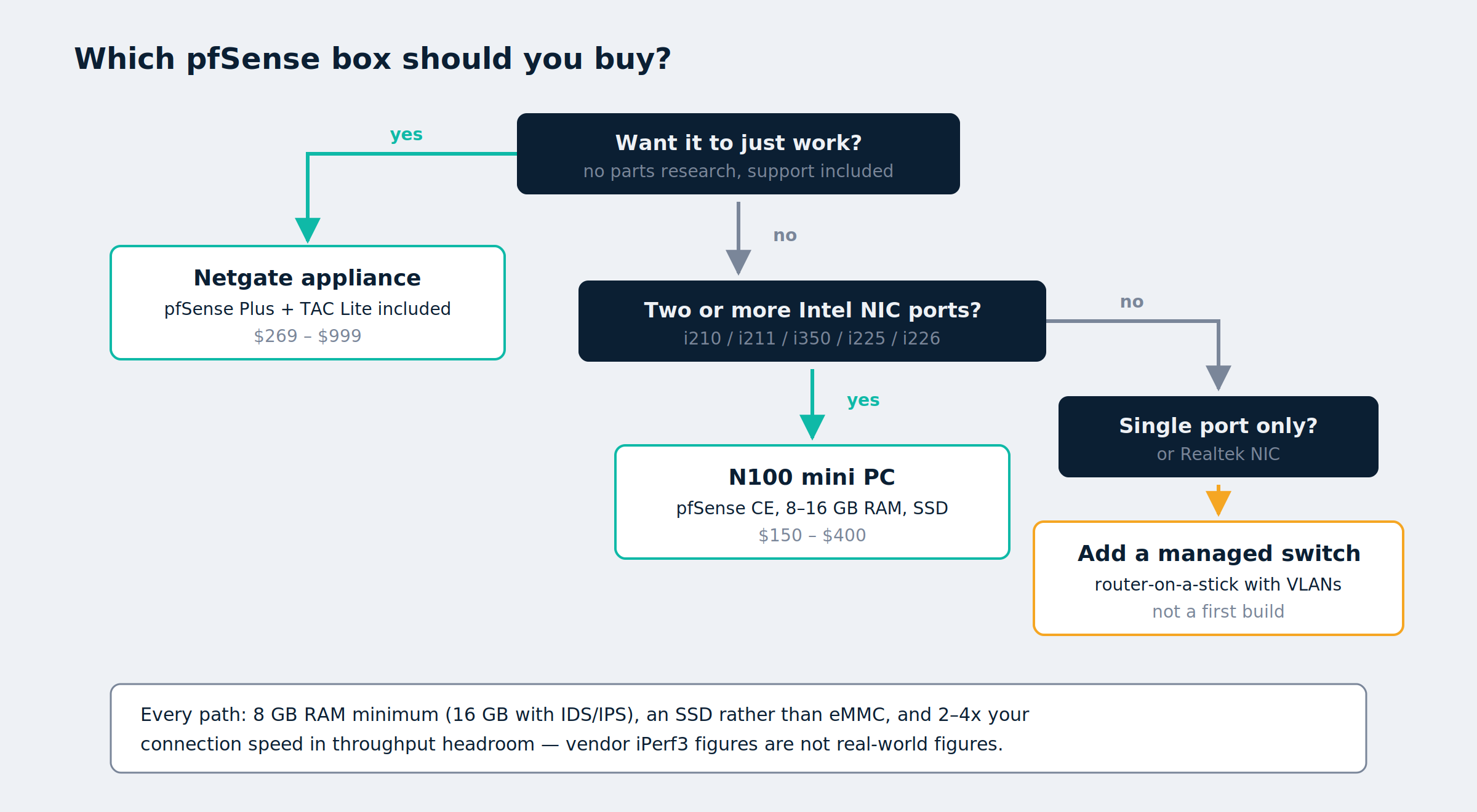
Short answer: for most homes, an Intel N100 mini PC with two or more Intel i226-V ports, 8 GB of RAM, and a small SSD handles a gigabit connection without effort and draws about as much power as a light bulb. If you’d rather not think about it, a Netgate appliance starts at $269 with pfSense Plus included.
The rest of this post is about the decisions underneath that answer — because the specification that matters most isn’t the CPU, and two of the numbers you’ll see quoted everywhere don’t mean what they appear to mean.
Buy an appliance or build it yourself?
| Netgate appliance | Mini PC | Repurposed PC | |
|---|---|---|---|
| Cost | $269–$999 | $150–$400 | Already owned |
| Software | pfSense Plus included | pfSense CE free | pfSense CE free |
| NIC quality | Known good | Check the chipset | Usually Realtek |
| Power draw | 5–15 W | 6–20 W | 40–100 W+ |
| Noise | Fanless | Usually fanless | Fans |
| Support | TAC Lite included | Community | Community |
| Effort | Unbox, configure | Pick parts, install | Add a NIC, install |
The software difference is worth understanding before you choose. pfSense CE is free on any hardware. pfSense Plus is included at no charge with a Netgate appliance — but on third-party hardware it requires a paid TAC Lite subscription through the Netgate Installer. There’s no free Plus license for a home-built box. For most home setups CE is entirely sufficient; just don’t buy a mini PC expecting Plus to come along with it.
Current Netgate pricing runs from $269 for the 1100, through $369 for the 2100 BASE and $412 for the 2100 MAX, to $599 for the 4200 MAX, with the 6100 at $899–$999 and the rack-mount 8200 MAX at $1,749.
The number everyone quotes, and why it misleads
Vendor throughput figures are measured with iPerf3, which sends large packets. Real traffic doesn’t look like that — it’s a mix of small ACKs, DNS lookups, and full-size data frames, which the industry models as IMIX. Firewalls are limited by packets per second, not bits per second, so smaller packets cost disproportionately more CPU.
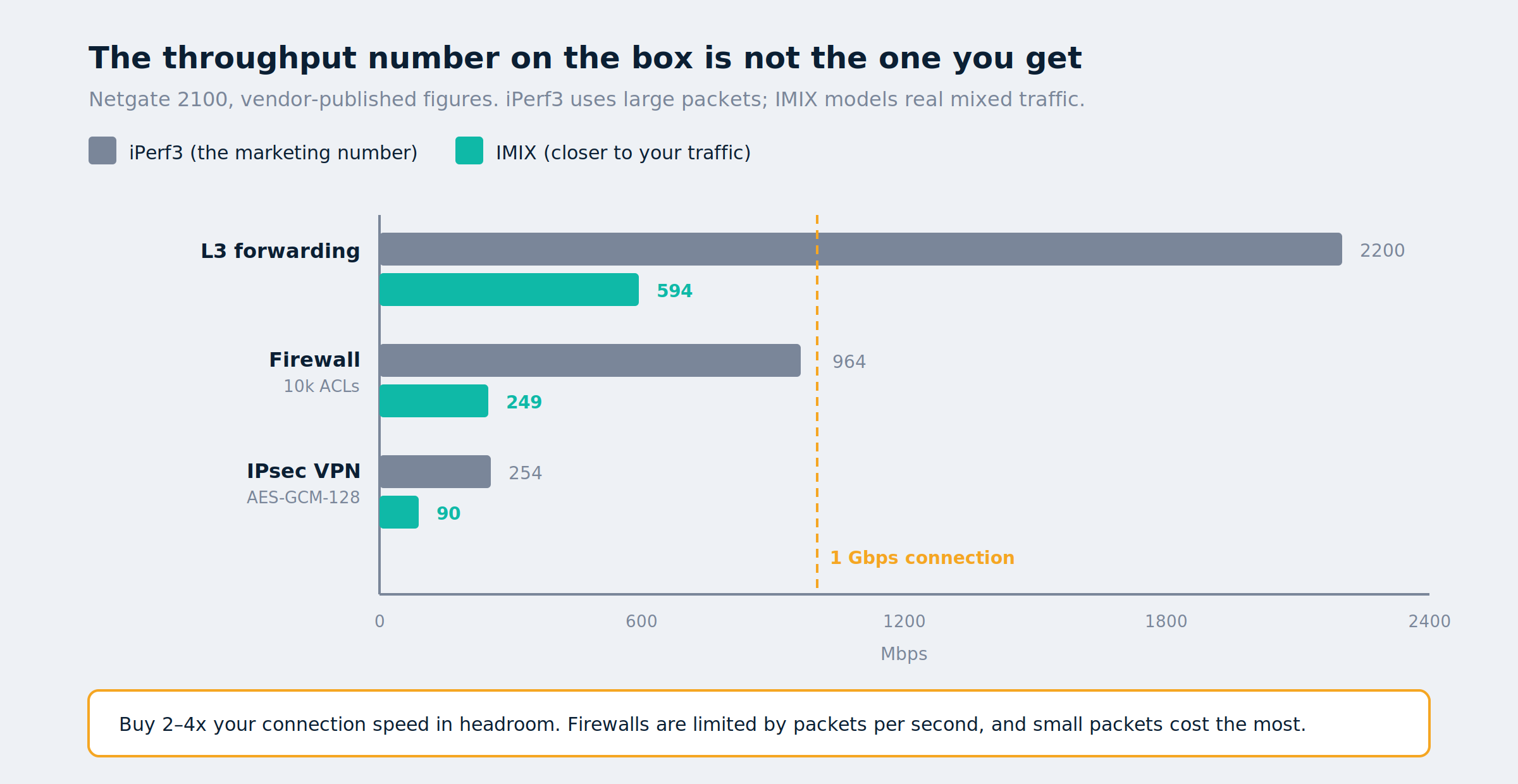
Netgate publishes both figures, which makes the gap easy to see. On the 2100:
| Measurement | iPerf3 | IMIX |
|---|---|---|
| L3 forwarding | 2.20 Gbps | 594 Mbps |
| Firewall (10k ACLs) | 964 Mbps | 249 Mbps |
| IPsec VPN | 254 Mbps | 90 Mbps |
Roughly a 4x difference between the headline and the realistic figure. A box advertised at “1 Gbps firewall throughput” may deliver a quarter of that on traffic resembling yours. Credit to Netgate for publishing both — most vendors quote only the flattering number.
Practical takeaway: buy 2–4x more headroom than your internet connection, not 1x.
AES-NI won’t speed up WireGuard
This is the error worth correcting, because it appears in nearly every pfSense hardware guide.
AES-NI is a CPU instruction set that accelerates AES encryption. It genuinely matters for IPsec and OpenVPN, both of which typically use AES — Netgate’s own IPsec benchmarks are quoted with AES-GCM-128 and AES-NI for exactly this reason.
WireGuard doesn’t use AES. It uses ChaCha20-Poly1305, a stream cipher deliberately designed to be fast on CPUs without crypto acceleration. AES-NI does nothing for a WireGuard tunnel. What WireGuard throughput actually tracks is raw single-core clock speed and memory bandwidth.
So if your VPN plans are the WireGuard remote-access setup or a multi-site link, ignore AES-NI marketing and buy clock speed. If you’re running IPsec to a corporate endpoint, AES-NI is worth having — and every current Intel N-series and Atom C-series part includes it anyway, so this rarely changes what you buy. It changes what you should expect.
One related finding from testing on this site: kernel WireGuard on pfSense is fast, but Tailscale’s userspace implementation on the same box is markedly slower, because FreeBSD can only run it in userspace. If you’re weighing the two, that’s covered in Tailscale vs. WireGuard on pfSense. No amount of hardware fixes an architectural difference.
The NIC matters more than the CPU
If you take one thing from this post: check the network chipset before you check anything else. A slow CPU makes your firewall slow. A bad NIC makes it unreliable, which is worse and much harder to diagnose.
| Chipset | Speed | Verdict |
|---|---|---|
| Intel i210 / i211 / i350 | 1 GbE | The gold standard, boring and reliable |
| Intel i225-V / i226-V | 2.5 GbE | Current mainstream choice |
| Realtek RTL8125 | 2.5 GbE | Works, but a driver history you don’t want |
| Realtek RTL8111 | 1 GbE | Avoid for a firewall |
Realtek’s 2.5GbE parts have a long record of driver trouble on FreeBSD, which is what pfSense is built on. They’ve improved — but “improved” isn’t the word you want describing the component your entire network depends on.
The i225/i226 family deserves a nuanced note rather than a verdict. Netgate uses i226-V in its own 4200 and 8200 appliances and reports no issues, and plenty of people run N100 boxes with i226-V without trouble. There are also credible reports of repeated disconnects on specific cheap boards. The pattern suggests board implementation and firmware revision rather than the chip itself. Buy from a seller who’ll take a return, and test before you commit.
A single-NIC box is not a firewall candidate. You need at least two interfaces — one WAN, one LAN. Many cheap mini PCs ship with one Realtek port. You can run router-on-a-stick with a single port and a VLAN-capable managed switch, which is a legitimate design covered in the VLAN segmentation guide, but it’s not the simplest first build.
How much CPU, RAM, and storage
CPU. An Intel N100 — 4 cores, up to 3.4 GHz, 6 W TDP — routes a gigabit connection with CPU to spare, typically under 10% utilization on plain NAT. That covers the overwhelming majority of home connections. Step up to an N305 or an Atom C-series only for multi-gigabit internet, IDS/IPS on every packet, or heavy VPN throughput.
RAM. 8 GB is the sensible floor and costs almost nothing over 4 GB. Base pfSense is happy in far less; the packages are what consume memory. Suricata with the ET Open ruleset uses roughly 500 MB, and the ET Pro ruleset can exceed 2 GB. Run IDS/IPS with too little RAM and rules get silently truncated — a failure mode that looks like working security but isn’t. If Suricata or Snort is a real plan, 16 GB.
Storage. Any small SSD. 128 GB is more than enough. Avoid eMMC where you have the choice — logs and state tables write constantly, and eMMC wears out. An M.2 SATA or NVMe drive costs little more and lasts far longer.
The rest of the shopping list
The box is the part everyone plans for. These are the items that turn a delivery into a working firewall, and the ones people end up ordering separately two days later.
| Item | Why you need it | Rough cost |
|---|---|---|
| USB flash drive, 16 GB | Writing the pfSense installer. Any cheap one works | $8 |
| Cat6 patch cables | At minimum: modem→WAN, LAN→switch. Buy one more than you think | $10 |
| USB-to-serial console cable | Netgate appliances have no video output — this is the only way in if the network config locks you out. Get an FTDI-chipset cable, not a no-name Prolific clone | $15 |
| SO-DIMM RAM, DDR4 or DDR5 16 GB | Only if your mini PC ships with 8 GB and you plan on IDS/IPS. Match the generation the board takes | $35 |
| M.2 NVMe SSD, 256 GB | If the box ships with eMMC, or with no drive at all | $25 |
| Thermal pads, 1–1.5 mm | Many fanless mini PCs ship with thin or poorly seated pads between SoC and case. A $8 pack can drop temperatures 10–15°C | $8 |
| Cable labels | You will renumber your network at some point. Label the runs now | $10 |
| Hook-and-loop cable ties | Reusable, unlike zip ties, and you’ll be re-cabling more than you expect | $8 |
| Small UPS, 600–850 VA | A firewall that loses power mid-write can corrupt its config. Also keeps the modem alive through brownouts | $80 |
| Cable tester | Only if you’re running your own Ethernet. Finds a bad crimp in seconds instead of an evening | $20 |
| 2.5GbE managed switch | Required if you’re doing VLANs or router-on-a-stick. See the VLAN guide for what to look for | $60–$150 |
The console cable is the one people skip and regret. The first time a firewall rule locks you out of your own management interface, the alternative to serial access is a keyboard, a monitor, and a factory reset.
Where to buy:
- Mini PC, N100 with dual Intel i226-V
- USB flash drive, 16 GB
- Cat6 patch cables
- USB-to-serial console cable, FTDI chipset
- SO-DIMM RAM, 16 GB
- M.2 NVMe SSD, 256 GB
- Thermal pads
- Cable labels
- Hook-and-loop cable ties
- Small UPS
- Cable tester
- 2.5GbE managed switch
Netgate appliances are sold direct through Netgate, not through retailers.
What it costs to run
A firewall runs 24/7/365, so idle power is a real line item — and it’s where a repurposed desktop quietly loses to a $200 mini PC.
| Device | Typical draw | Annual kWh | Annual cost at $0.16/kWh |
|---|---|---|---|
| N100 mini PC | 10 W | 88 | $14 |
| Netgate 2100 | 8 W | 70 | $11 |
| Old desktop PC | 60 W | 526 | $84 |
| Gaming PC as router | 100 W | 876 | $140 |
Substitute your own rate — the formula is watts × 8.76 = annual kWh. That old Optiplex in the closet is free to acquire and roughly $70 a year more expensive to run. Over three years, the “free” option costs more than the one you’d have bought.
Step 1 — Work out what you actually need
Before shopping, write down three numbers: your internet speed, whether you’ll run IDS/IPS, and your expected VPN throughput.
Most people over-buy on the first and under-buy on the second. A 500 Mbps connection with no IDS needs remarkably little. The same connection with Suricata inspecting every packet needs several times the CPU and four times the RAM.
Step 2 — Verify the NIC chipset before purchasing
Product listings say “2.5G LAN” without naming the controller. That’s a red flag worth resolving before money changes hands. Ask the seller, find a review that ran dmesg, or check a teardown photo.
You want to see i226, i225, i210, i211, or i350 — not RTL.
Step 3 — Confirm what the hardware reports after install
Once pfSense is installed, from Diagnostics > Command Prompt or SSH:
pciconf -lv | grep -A2 network
sysctl hw.model hw.ncpu
sysctl dev.cpu.0.temperature
The first names the actual controllers, which is the moment you find out whether the listing was honest. Intel gigabit parts appear as igb, i225/i226 as igc, Realtek as re. The second confirms CPU and core count. The third gives a baseline temperature for the next step.
Check AES-NI is present if you plan to run IPsec:
grep -i aesni /var/log/dmesg.boot
Step 4 — Load-test before you trust it
Don’t wait for a real outage to discover a marginal NIC. Run iperf3 -s on a LAN host, push traffic through the firewall for a sustained period, then check for problems:
iperf3 -c 192.0.2.50 -t 300
netstat -i | grep -i err
sysctl dev.cpu.0.temperature
Sustained errors on an interface point at the NIC or its driver. A temperature climbing past about 90°C means thermal throttling, and throughput will degrade under exactly the load you bought the box for — fanless cases in enclosed cabinets are the usual cause, and this is where those thermal pads earn their $8.
Test for at least half an hour. Marginal hardware often passes a 10-second test.
Step 5 — Return it if it misbehaves
This is why buying from a seller with a real return policy matters more than saving $20. Intermittent NIC disconnects are not something you debug into submission — they’re something you send back. Decide within the return window, which means testing on day one rather than after the weekend you set aside for the migration.
FAQ
What are the minimum hardware requirements for pfSense?
Far lower than most guides suggest — a 64-bit CPU, 1 GB of RAM, and 8 GB of storage will boot it. But minimum isn’t sensible. Plan on a modern low-power quad-core, 8 GB of RAM, and a small SSD, which costs little more and leaves room for packages.
Is a Netgate appliance worth it over a mini PC?
It depends on what your time is worth. You pay a premium for known-good hardware, pfSense Plus included, and TAC Lite support. A mini PC costs less and gives more CPU per dollar, at the cost of vetting the NIC yourself and running CE. Neither is wrong.
Do I need AES-NI?
For IPsec or OpenVPN, yes — it makes a large difference. For WireGuard, no: WireGuard uses ChaCha20-Poly1305, not AES, so AES-NI is irrelevant to it. Every current Intel N-series part has AES-NI anyway.
Is the Intel i226-V reliable on pfSense?
Mostly. Netgate ships it in its own appliances and most users have no trouble. A minority report disconnects on specific low-cost boards, which points at board implementation rather than the controller. Buy returnable and load-test early.
Can I use a mini PC with only one Ethernet port?
Only with a VLAN-capable managed switch, using router-on-a-stick. It works and it’s a legitimate design, but two physical ports is simpler and cheaper than the switch you’d need.
How much RAM do I need for Suricata or Snort?
16 GB if IDS/IPS is a real plan. The ET Open ruleset alone uses around 500 MB and ET Pro can exceed 2 GB, and running short causes rules to be silently truncated rather than failing loudly.
Do I really need a serial console cable?
If you bought a Netgate appliance, yes — there’s no video output, so serial is the only local access. On a mini PC with HDMI it’s optional, but a $15 cable is cheaper than the reinstall you’ll otherwise do after locking yourself out with a firewall rule.
Will an old desktop work as a pfSense box?
Yes, and it’ll cost roughly $70–$140 a year in electricity versus about $14 for a mini PC. It also probably has a Realtek NIC. Fine for a lab; a poor permanent choice.
Do I need 2.5 GbE?
Only if your internet is faster than a gigabit or you move large files between segments through the firewall. Intel gigabit chipsets are the most reliable parts in this category, and there’s no shame in buying them deliberately.
Related reading
- pfSense WireGuard IPv6 Setup — the first thing worth building once the hardware is running
- VLAN Segmentation on pfSense — required reading if you bought a single-NIC box
- Tailscale vs. WireGuard on pfSense — why the same hardware performs very differently depending on which one you run
Recap
- Check the NIC chipset first — Intel i210/i211/i350 at gigabit, i225-V/i226-V at 2.5 GbE, and treat Realtek as a compromise.
- Vendor iPerf3 numbers overstate real-world capability by roughly 4x; buy 2–4x your connection speed in headroom.
- AES-NI accelerates IPsec and OpenVPN. It does nothing for WireGuard, which uses ChaCha20-Poly1305.
- An N100 handles a gigabit connection at under 10% CPU; step up only for multi-gig, IDS/IPS, or heavy VPN.
- 8 GB RAM minimum, 16 GB if you’ll run Suricata — too little RAM truncates rulesets silently.
- Avoid eMMC storage; a small SSD costs little more and survives constant log writes.
- Budget for the small stuff: installer USB, patch cables, a serial console cable, and a UPS.
- Power is a real cost: about $14/year for a mini PC versus $84+ for a repurposed desktop.
- pfSense Plus is free only on Netgate hardware; third-party boxes need a paid TAC Lite subscription, so plan on CE.
- Load-test for 30 minutes inside the return window, and send back anything that logs interface errors.