
Ghost Crashes on SVG Upload: The Missing Fontconfig Bug
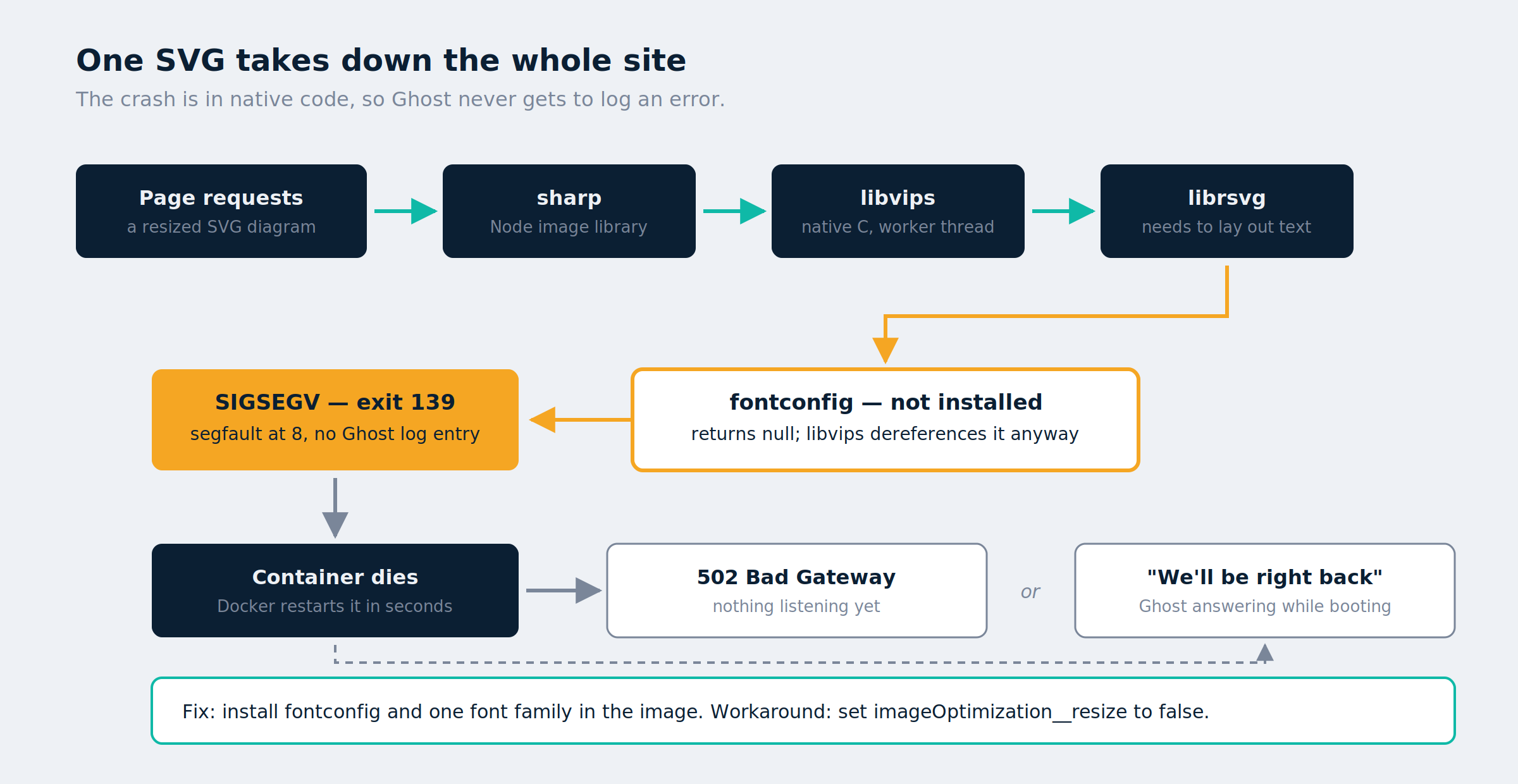
If your self-hosted Ghost site returns a 502 Bad Gateway or Ghost’s own “We’ll be right back” page every time you edit a post, and recovers after a few reloads, the cause may not be anything you configured. The official Ghost Docker image ships without fontconfig. libvips renders SVG through librsvg, librsvg needs fontconfig to lay out text, and without it the process dies with SIGSEGV — taking your entire site down with it.
Any SVG in your content library triggers it. One diagram is enough to make the site unusable while you’re publishing.
This post covers the symptom, why a native segfault is unusually hard to diagnose, the commands that isolate it, and the Dockerfile fix. It also covers two theories that looked right and weren’t, because the wrong turns are where the time goes.
The symptom: 502 Bad Gateway or “We’ll be right back”
You save or preview a post. The page returns one of two things:
- Cloudflare 502 Bad Gateway — the proxy reached your origin and got nothing back
- Ghost’s “We’ll be right back” page — Ghost answered, but it was still booting
Reload a few times and it works. An hour later it happens again. Nothing in the Ghost admin log suggests a problem, and the site looks fine to visitors who aren’t unlucky.
Those two pages are the same event at different moments: Ghost is dead, and you’re seeing either the gap before it restarts or the boot sequence after. Cloudflare and nginx are reporting the problem, not causing it.
Why a libvips segfault is hard to diagnose
Three things conspire to hide it.
The crash is below JavaScript. libvips is a native C library. When it segfaults, no try/catch in Node can intercept it and Ghost logs no error — the process simply ceases. Your last log line is whatever happened to be printing at the time, which is usually unrelated.
Docker restarts it immediately. With restart: always, the container is back in seconds. By the time you look, everything is running normally.
The trigger looks like editing, not images. You associate the crash with saving posts, because that’s when you’re loading pages that request resized images. The actual trigger is one file in your content library.
Step 1 — Check whether the Ghost container is restarting
Everything downstream depends on this. From your compose directory:
docker compose ps
docker inspect --format '{{.Name}} restarts={{.RestartCount}} started={{.State.StartedAt}}' $(docker compose ps -q)
A RestartCount climbing into the dozens while every other container sits at zero tells you the fault is Ghost-specific — not the host, not the database, not the tunnel.
One trap worth naming: .State.ExitCode reports 0 for a container that is currently running, regardless of how previous instances died. Reading that as “it exited cleanly” sends you hunting for something that sent SIGTERM. Nothing did.
Step 2 — Catch the Docker exit code with docker events
The exit code only means something at the moment of death, so watch the event stream. In one terminal:
docker events --filter container=<your-ghost-container>
Leave it running and reproduce the problem. You want the die line:
container die ... execDuration=9, exitCode=139, ...
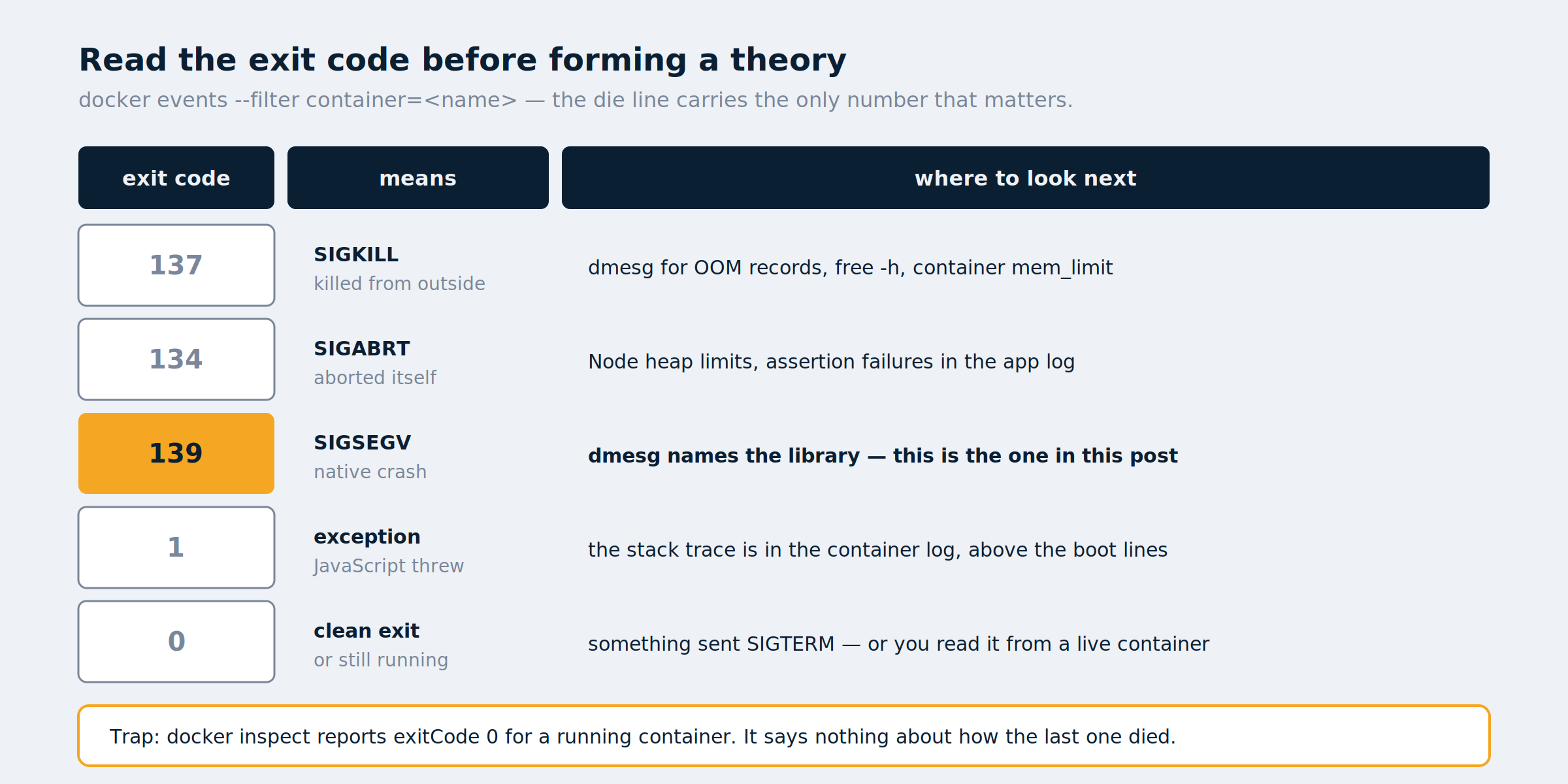
| Exit code | Signal | Meaning |
|---|---|---|
| 0 | — | Clean exit, or a currently-running container |
| 1 | — | Unhandled JavaScript exception |
| 134 | SIGABRT | Abort, often a Node heap failure |
| 137 | SIGKILL | OOM killer, or a forced stop |
| 139 | SIGSEGV | Segmentation fault in native code |
Exit code 139 is decisive. A segfault means native code, and Ghost’s only meaningful native dependency in this path is sharp, which wraps libvips.
Note execDuration=9 in that example: the container died nine seconds after starting. It crashes on the same request as soon as it returns, which is why several reloads eventually get through — you’re racing the crash.
Step 3 — Find the faulting library with dmesg
This is the step that turns inference into fact:
sudo dmesg -T | grep -iE 'segfault|general protection|trap' | tail -20

[Wed Aug 12 23:41:52 2026] libvips worker[20949]: segfault at 8 ip 000073fb659c2bc7
  sp 000073f8cfffbbc0 error 4 in libvips-cpp.so.8.16.1[3dcbc7,73fb655e6000+ece000]
The library is named outright. segfault at 8 means a dereference at offset 8 from a null pointer — something returned NULL and the caller used it without checking.
Note it’s a worker thread, not the main one. That matters later.
Step 4 — Test every image through sharp
Test each image one process per file, so a crash takes down only that test and the loop continues:
docker exec <ghost-container> sh -c '
export NODE_PATH=/var/lib/ghost/versions/<version>/node_modules
cd /var/lib/ghost/content/images
find . -type f \( -name "*.png" -o -name "*.jpg" -o -name "*.webp" \) | while read f; do
  node -e "require(\"sharp\")(\"$f\").resize(2000).toBuffer().then(()=>process.exit(0)).catch(()=>process.exit(2))" >/dev/null 2>&1
  rc=$?
  [ "$rc" -eq 0 ] || echo "exit=$rc  $f"
done'
Substitute your Ghost version — ls /var/lib/ghost/versions/ will tell you.
Every raster file may come back clean. That result is misleading, because the find pattern above excludes SVG. Run it again for SVGs:
docker exec <ghost-container> sh -c '
export NODE_PATH=/var/lib/ghost/versions/<version>/node_modules
cd /var/lib/ghost/content/images/2026/08
for f in *.svg; do
  node -e "require(\"sharp\")(\"$f\").resize(2000).toBuffer().then(()=>process.exit(0)).catch(()=>process.exit(2))" >/dev/null 2>&1
  echo "$? $f"
done'
If every SVG returns 139, it isn’t one corrupt file. It’s the format.
Step 5 — Confirm fontconfig is missing
docker exec <ghost-container> sh -c 'fc-list | wc -l'

sh: 1: fc-list: not found
Fontconfig isn’t installed. Not misconfigured, not empty — absent.
The chain: Ghost requests a resized SVG → sharp hands it to libvips → libvips renders SVG through librsvg → librsvg asks fontconfig to lay out the text → fontconfig isn’t there → null → segfault at 8 → SIGSEGV → the container dies → your proxy shows 502 while Docker restarts it.
Text-heavy SVGs — diagrams, in other words — hit this every time.
Step 6 — Prove the fix in the running container
Install the packages into the live container as a test:
docker exec -u root <ghost-container> sh -c \
  'apt-get update -qq && apt-get install -y -qq fontconfig fonts-dejavu-core && fc-cache -f && fc-list | wc -l'
Then re-run the SVG scan from Step 4. Every 139 should become 0. That’s the confirmation — the packages vanish on the next container recreate, so this is a test, not the fix.
Step 7 — Add fontconfig permanently with a Dockerfile
Create a Dockerfile next to your compose.yaml:
FROM ghost:5.130.6

USER root
RUN apt-get update \
    && apt-get install -y --no-install-recommends fontconfig fonts-dejavu-core \
    && fc-cache -f \
    && rm -rf /var/lib/apt/lists/*
USER node
Then in compose.yaml, replace the ghost service’s image: line with:
build: .
And rebuild:
docker compose up -d --build ghost
docker exec <ghost-container> fc-list | wc -l
docker inspect <ghost-container> --format 'restarts={{.RestartCount}}'
A nonzero font count confirms the build worked. Then edit and view a few posts and check the restart count hasn’t moved.
Pin the version in FROM rather than using a floating tag. Moving to a new Ghost release then becomes a deliberate edit to that line plus docker compose up -d --build.
Workaround: disable Ghost image resizing
If you can’t rebuild right now, Ghost can be told not to resize images at all. In the ghost service’s environment:
imageOptimization__resize: "false"
This stops Ghost invoking sharp, so nothing reaches libvips. Your site works immediately.
The cost is real: Ghost serves originals instead of generating responsive derivatives, so a 2400px feature image goes to phones at full weight. Use it as a tourniquet, not a fix.
How a crash loop truncates your Ghost sitemap
Ghost builds its sitemap from an in-memory URL service that is rebuilt on every boot. Crash the process partway through that rebuild, repeatedly, and you can end up serving a truncated sitemap.
On the site this post came from, three of six published posts were missing from sitemap-posts.xml — silently, with no error anywhere. The posts were live and reachable; they simply weren’t being advertised to search engines.
One clean restart after the fix regenerated the complete file. Worth checking after any crash loop:
curl -s https://yoursite.com/sitemap-posts.xml | grep -c "<loc>"
If that number is lower than your post count, resubmit the sitemap in Search Console once it’s correct.
Two theories that looked right: OOM and Alpine
Worth recording, because both are plausible and both cost time.
It isn’t the OOM killer. A crash-restart loop on a small VPS looks exactly like memory exhaustion, and image processing genuinely does spike memory. But free -h showed 2.6 GB available, dmesg had no OOM records, and .State.OOMKilled was false. Exit code 137 would indicate a kill; 139 does not.
It isn’t Alpine. ghost:5-alpine uses musl rather than glibc, and sharp on musl has a long history of trouble, so switching to the Debian-based image is a reasonable first move. It changed nothing — because fontconfig is missing from both images. The base OS was never the variable.
The clue that pointed at the answer was visible early: a Fontconfig error: Cannot load default config file line appeared in the logs one to two seconds before every crash. It’s easy to dismiss as noise, and dismissing it costs an hour.
Ghost SVG crash FAQ
Why does my Ghost site return 502 Bad Gateway after editing a post? Because the Ghost process is crashing and Docker is restarting it. If there’s an SVG anywhere in your content library, start with the exit code — 139 points at libvips.
What does exit code 139 mean in Docker? SIGSEGV, a segmentation fault in native code. Not a JavaScript error, and not an out-of-memory kill — that’s 137. Run dmesg on the host to see which library faulted.
Does this affect Ghost installs that aren’t in Docker? Usually not. Most Ubuntu and Debian servers already have fontconfig as a dependency of something else. This is primarily a container problem, because container images are deliberately minimal.
Will the diagrams render correctly after the fix? They’ll render, but only in fonts you actually installed. fonts-dejavu-core gives you one family, and an SVG asking for a font that isn’t present gets substituted — so check a diagram-heavy post visually, since text can reflow enough to overrun its boxes.
Should I just avoid uploading SVG to Ghost? That’s the pragmatic answer, and it’s what I do now: export diagrams to PNG and keep the SVG as source. PNG avoids the code path entirely. But if there’s an SVG already in your library — a logo, a favicon — you have the bug whether you upload more or not.
Why does it only crash sometimes? It crashes every time an SVG is resized. It looks intermittent because Ghost caches the derivative after a successful render, and because you’re only occasionally loading a page that requests one.
Is VIPS_CONCURRENCY=1 worth setting? It won’t fix this, but it’s cheap insurance. The segfault happens in a libvips worker thread, and serialising libvips removes a class of threading bugs. On a two-core VPS you lose almost nothing.
Has this been reported upstream? There are Ghost issues about libvips crashes from other causes — notably illegal-opcode crashes on CPUs lacking instructions the prebuilt binaries expect, issue #13986 — and forum threads about silent crashes during image upload with no diagnosis. I haven’t found the SVG-plus-missing-fontconfig path documented anywhere, which is why this post exists.
Related reading
- Self-Hosted Email with Mail-in-a-Box — another self-hosted service where the real failure modes are quieter than the documentation suggests
- Tailscale vs. WireGuard on pfSense — what happens when a userspace library sits where a kernel path should be
- pfSense Hardware Guide — choosing hardware that won’t surprise you in the same way
Recap
- Symptom: 502 Bad Gateway or Ghost’s maintenance page after editing a post, clearing after a few reloads.
- The official Ghost Docker image ships without fontconfig. libvips renders SVG through librsvg, which needs it, and dies with SIGSEGV when it’s absent.
.State.ExitCodereads 0 for a running container — catch the real code withdocker eventsinstead.- Exit code 139 means a native segfault;
dmesgnames the faulting library. - Test images one process per file so a crash doesn’t end the scan, and remember to include SVG in the pattern.
- Fix: a two-line Dockerfile adding
fontconfigandfonts-dejavu-core. - Workaround:
imageOptimization__resize: "false", at the cost of responsive images. - Check your sitemap afterwards — a crash loop can leave it truncated with no error anywhere.
- Prefer PNG for diagrams regardless. It avoids the code path entirely.